
Website Audit Checklist for Small Businesses: A Step-by-Step Guide


Your website is often the first impression potential customers have of your business. Whether someone finds you through Google, social media, referrals, or AI-powered search tools, your website plays a major role in how they evaluate your brand.
However, many small businesses build a website and rarely revisit it afterward. Over time, pages become outdated, forms stop working properly, content loses relevance, and technical issues begin affecting performance. These problems may not always be obvious, but they can have a significant impact on traffic, leads, and conversions.
This is where a website audit becomes valuable.
In this guide, we'll walk through a practical website audit checklist designed specifically for small businesses and growing companies. You'll learn what to review, why it matters, and how to create an action plan that supports long-term growth.
1. What Is a Website Audit?
A website audit is a comprehensive review of your website's performance, usability, SEO, content, and technical health. Its purpose is to identify issues that may be limiting your ability to attract visitors, generate leads, and convert customers.
Think of a website audit as a health check for your website.
Just as businesses regularly review finances, operations, and marketing performance, websites should also be evaluated consistently. Even websites that look visually appealing can have hidden problems that affect rankings, user experience, and conversions.
A complete website audit typically examines:
Website navigation and usability
Mobile responsiveness
Page speed and performance
Search engine optimization (SEO)
Content quality and relevance
Analytics and tracking setup
Conversion opportunities
Security and maintenance
The goal is not simply to find problems. The goal is to understand how your website supports your business objectives and identify opportunities to improve results.
2. Why Is a Website Audit Important for Small Businesses?
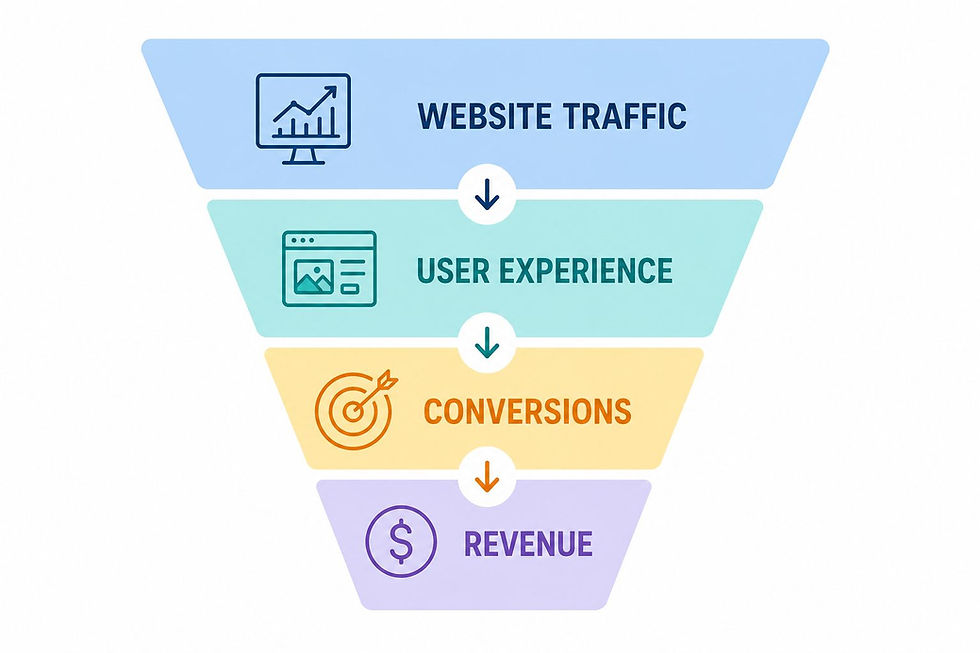
A website audit helps small businesses identify barriers that may be preventing growth. Even small issues can impact search visibility, user engagement, and lead generation over time.
Unlike large enterprises with dedicated teams, small businesses often operate with limited resources. As a result, website problems can go unnoticed for months or even years. A regular audit helps uncover those issues before they become larger problems.
Improve Search Visibility
A website audit helps improve search visibility by identifying technical, content, and user experience issues that may prevent pages from ranking well in search results. Search engines continuously evaluate websites to determine which pages deserve visibility in search results.
If your website has:
Missing metadata
Broken links
Slow-loading pages
Poor content structure
Mobile usability issues
Your rankings may suffer regardless of how valuable your products or services are.
Regular audits help ensure your website remains aligned with current SEO best practices and search engine expectations.
Increase Website Conversions
A website audit helps increase conversions by identifying obstacles that prevent visitors from taking action, such as contacting your business, requesting a quote, or making a purchase.
Getting traffic is only part of the equation. Your website should encourage visitors to take meaningful actions, including:
Requesting a quote
Scheduling a consultation
Submitting a contact form
Downloading a resource
Making a purchase
An audit helps uncover friction points that may be reducing conversion rates.
Common issues include:
Forms that are too long or complicated
Calls-to-action that are difficult to find
Landing pages that lack trust signals
Navigation that creates confusion
Mobile experiences that make completing actions difficult
Even small improvements in these areas can significantly increase the number of leads, inquiries, and sales generated by your website.
Enhance User Experience
A website audit helps improve user experience by identifying issues that make it difficult for visitors to navigate, find information, and complete important actions.
User experience directly affects how people interact with your website. When users can easily find what they need and move through your site without frustration, they are more likely to stay engaged and take action.
A poor user experience can lead to:
Higher bounce rates
Lower engagement
Reduced trust
Fewer conversions
Website audits help uncover usability issues that may be negatively impacting the customer journey, allowing you to create a smoother, more effective experience for your visitors.
Improving user experience should be part of an ongoing website management process rather than a one-time task. To learn more about maintaining and optimizing your website over time, explore our guide on Website Management for Small Businesses: Improve UX & Growth.
Reduce Technical Issues
A website audit helps identify and resolve technical issues before they impact your website’s performance, search visibility, and user experience. Many technical problems remain unnoticed until they begin affecting traffic, conversions, or website functionality.
Common issues include:
Broken forms
Missing redirects
Indexing issues
Duplicate pages
Crawl errors
Security vulnerabilities
Regular audits help detect these problems early, ensuring your website remains accessible, secure, and optimized for both users and search engines.
3. How Often Should You Audit Your Website?
Most small businesses should perform a website audit every three to six months. Regular reviews help identify issues before they affect search rankings, lead generation, or user experience.
The ideal frequency depends on several factors:
Audit More Frequently If You:
Publish content regularly
Run SEO campaigns
Launch new landing pages
Manage multiple service pages
Frequently update products or services
Audit Less Frequently If You:
Have a relatively static website
Make a few content updates
Operate in a highly niche market
At a minimum, every business should conduct a comprehensive website audit at least twice per year.
4. How to Audit Your Small Business Website Step by Step
A small business website audit helps you understand what is working, what is missing, and what may be preventing your website from generating better results.
Instead of looking at your website only from a design perspective, an audit reviews key areas such as SEO, user experience, content, speed, mobile performance, analytics, and conversions. By following a structured process, you can identify the most important issues and prioritize improvements that support visibility, trust, and business growth.
Step 1: Review Your Website Navigation
Website navigation should make it easy for visitors to find information, services, and contact details within seconds. If users cannot quickly understand where to go next, they are more likely to leave your website without taking action.
When auditing your website, start by evaluating how easily visitors can move through the site and access important pages. A clear navigation structure improves user experience, increases engagement, and supports conversions.
Review the following areas:
Main menu structure
Footer navigation
Internal linking between pages
Service page accessibility
Contact page visibility
In many cases, a simple navigation structure performs better than a complex one. Well-known companies such as Airbnb keep navigation streamlined and guide users toward the actions that matter most.
Ask yourself:
Can visitors understand what your business does within a few seconds?
Can they find your services quickly?
Is your contact information easy to locate?

Step 2: Check Mobile Friendliness
A mobile-friendly website provides a positive experience across smartphones and tablets. Since most web traffic now comes from mobile devices, mobile usability directly affects both rankings and conversions. Review your website on multiple screen sizes.
Check:
Text readability
Button sizes
Form usability
Menu functionality
Image scaling
Common mobile issues include:
Tiny buttons
Overlapping elements
Horizontal scrolling
Slow loading pages
Google primarily evaluates websites from a mobile perspective, making mobile optimization a critical part of any website audit.
Examples of mobile-friendly websites featuring responsive layouts, clear navigation, and optimized user experiences.
Step 3: Test Website Speed and Performance
Website speed affects user experience, engagement, and search visibility. Slow websites often experience higher bounce rates and lower conversion rates. Visitors expect pages to load quickly.
If a page takes too long to load, users may leave before engaging with your content.
Review:
Core Web Vitals
Largest Contentful Paint (LCP)
Interaction to Next Paint (INP)
Cumulative Layout Shift (CLS)
Server response times
Image optimization
Tools you can use:
Google PageSpeed Insights
GTmetrix
Lighthouse
For example, Amazon has publicly discussed the relationship between website speed and customer experience. Even small delays can negatively affect engagement and revenue.
For small businesses, performance improvements often provide one of the fastest opportunities to improve results. If you're looking for practical ways to improve speed, security, and overall website performance, explore our guide on Website Management Tips to Keep Your Site Fast and Secure.

What Is a Good Website Speed Score?
A good PageSpeed score is generally considered 90 or above. For most small business websites, a desktop score above 90 and a mobile score above 70 indicate solid performance.
However, businesses should avoid focusing solely on achieving a perfect score. Google also evaluates real-world user experience through Core Web Vitals, including loading speed, responsiveness, and visual stability. A website that loads quickly, responds smoothly to user interactions, and provides a positive experience will often perform well even if its PageSpeed score is not a perfect 100.
Step 4: Review SEO Basics
SEO fundamentals help search engines understand, index, and rank your website. Even high-quality content may struggle to appear in search results if key SEO elements are missing or poorly optimized.
A website audit should include a review of both on-page and technical SEO factors that influence visibility. These elements help search engines understand what each page is about and how pages relate to one another across your website.
Review:
Title tags
Meta descriptions
Heading structure (H1, H2, H3)
Internal links
URL structure
Image alt text
XML sitemap
Indexability
Pay particular attention to whether important pages are properly optimized for their target topics and whether search engines can easily discover and crawl your content.
Many businesses invest significant time creating new content while overlooking the SEO foundations that help that content rank effectively.
Example: Companies such as HubSpot and Semrush consistently follow strong SEO practices by:
Using clear page hierarchies
Implementing descriptive headings
Building logical internal links
Optimizing metadata
Creating topic-focused content clusters
These practices make it easier for both users and search engines to navigate content, improving overall search visibility over time.
Step 5: Evaluate Content Quality
Content should remain accurate, relevant, and genuinely helpful to your audience. A website audit helps identify content that may be outdated, incomplete, or no longer aligned with user needs and business goals.
Even well-designed websites can struggle to perform if their content fails to answer user questions or provide clear next steps. Regular content reviews help ensure every page continues to deliver value.
Review:
Outdated information
Broken links
Thin content
Duplicate content
Missing calls-to-action
Inconsistent messaging
Ask:
Does this content still help users?
Is it aligned with current business goals?
Would a potential customer find it useful?
Does it answer common questions clearly?
Is there a clear next step for visitors?
Strong content should answer questions clearly while guiding users toward the next step.
If your content strategy needs improvement, explore our guide on “Creating a Content Strategy” that supports long-term growth and visibility.
Step 6: Check Analytics and Tracking
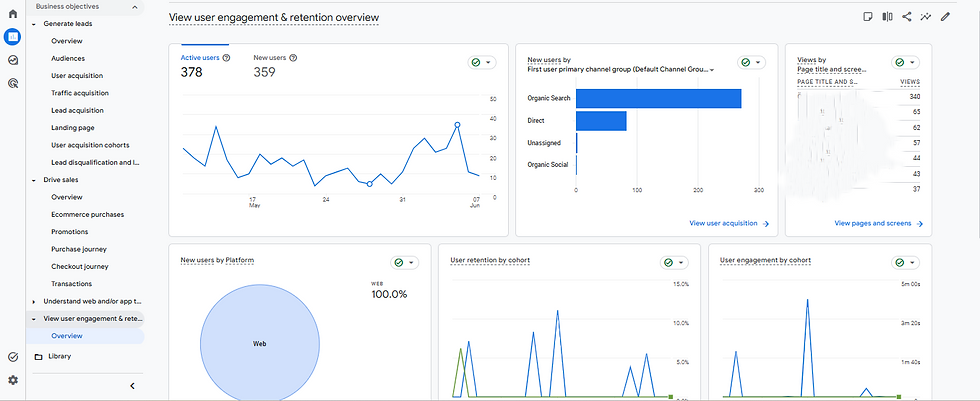
Analytics help businesses understand how visitors interact with their website. Without accurate tracking, decision-making becomes based on assumptions rather than data.
Review your setup for:
Google Analytics
Google Search Console
Microsoft Clarity
Conversion tracking
Form submissions
Event tracking
Questions to ask:
Which pages generate the most traffic?
Which pages generate leads?
Where are visitors dropping off?
Which channels drive conversions?
Tracking is essential for identifying both opportunities and problems.
Step 7: Review Lead Generation Elements
A website should do more than attract visitors. It should help convert them into leads and customers.
Review:
Contact forms
CTA buttons
Landing pages
Lead magnets
Testimonials
Case studies
Trust signals
Companies like Shopify and Slack excel at guiding visitors toward clear actions through strategically placed CTAs and simplified conversion paths.

Ask yourself:
Is it obvious what action visitors should take next?
Are CTAs visible throughout the site?
Are trust-building elements present?
If your website is generating traffic but not enough inquiries or sales, the issue may lie in your conversion strategy. Learn more in our guide on why websites fail to generate leads and how to improve lead generation: Why Your Website Isn't Generating Leads (And How to Improve Website Lead Generation Fast).
Step 8: Check Website Security
Website security helps protect your business, customer data, and website performance from potential threats. A secure website not only reduces risk but also helps maintain trust and credibility with visitors.
Website security protects both your business and your visitors. Security issues can damage trust, harm search visibility, and create operational risks.
Review:
SSL certificate
Plugin updates
Software updates
Password policies
Backup systems
Security monitoring tools
A secure website helps maintain credibility and protects business assets.
Website security is only one part of ongoing website health. To keep your site secure, fast, and performing effectively over time, explore our guide on Why Regular Website Maintenance Is Crucial for Your Business Growth.
Step 9: Identify Priority Fixes
A website audit is most effective when findings are organized into a clear action plan. Prioritizing issues helps you focus on improvements that will have the greatest impact on performance, user experience, and business results.
Not every issue needs immediate attention. Once you've completed your audit, categorize findings based on impact and urgency.
High Priority
Broken forms
Security vulnerabilities
Critical SEO issues
Major speed problems
Medium Priority
Content updates
Internal linking improvements
User experience enhancements
Low Priority
Minor design adjustments
Cosmetic improvements
Non-essential visual updates
By addressing high-impact issues first, you can often achieve meaningful improvements without investing significant additional resources. Prioritization ensures your time and budget are focused where they will create the greatest value.
Step 10: Create an Action Plan
A website audit only delivers results when identified issues are addressed through a clear and structured improvement plan.
Once you've completed your audit, organize your findings into actionable tasks and prioritize them based on business impact.
Your action plan should include:
Identified issues
Recommended solutions
Responsible team members
Deadlines
Expected outcomes
Consider breaking your roadmap into short-term, medium-term, and long-term initiatives to make implementation more manageable.
A structured action plan helps ensure improvements are completed consistently, tracked effectively, and aligned with broader business goals.
5. Common Website Audit Mistakes Small Businesses Make
Small businesses often miss important opportunities during a website audit by focusing on only one aspect of website performance instead of evaluating the entire user experience.
Only Focusing on Visual Design: A website can look great but still struggle to generate traffic, leads, or sales. Design should support usability and business goals.
Ignoring Mobile Users: Most visitors now browse on mobile devices. A poor mobile experience can lead to lost traffic and conversions.
Overlooking Conversion Paths: Visitors should know exactly what to do next. Hidden forms, weak CTAs, or confusing navigation can reduce conversions.
Forgetting Technical SEO: Issues like missing metadata, broken links, and indexing problems can limit your visibility in search results.
Not Using Analytics Data: Analytics helps you understand what is working and what needs improvement. Without data, optimization becomes guesswork.
Avoiding these common mistakes helps ensure your audit delivers meaningful insights rather than a simple checklist of issues. By taking a holistic approach, you can identify opportunities that improve visibility, user experience, and conversions at the same time.
6. When Should You Consider Professional Website Audit Services?
You should consider professional website audit services when your website is not delivering the results you expect and the root cause is unclear.
While basic audit tools can identify some issues, they often miss deeper technical, SEO, user experience, and conversion-related problems. A professional audit provides a more comprehensive evaluation and a clear roadmap for improvement.
You may benefit from professional support if:
Traffic has declined unexpectedly
Leads have decreased
Rankings have dropped
Conversion rates are stagnant
You're planning a redesign
You're investing in SEO or paid advertising
Professional audits often uncover technical and strategic opportunities that automated tools cannot identify. They can also help prioritize improvements based on business impact, ensuring your time and budget are invested in the areas that matter most.
If you're looking for expert guidance, DigiMinds Solutions provides website audit, design, development, and conversion optimization services to help businesses improve website performance and generate better results.
7. Takeaways: What Small Businesses Should Know About Website Audits
A successful website audit is not simply a process of finding technical issues. It is a structured evaluation that helps businesses improve visibility, user experience, conversions, and overall website performance.
Some of the most important lessons small businesses should remember include:
Website Audits Should Be Performed Regularly: Websites change over time as content, technologies, and business goals evolve. Conducting an audit every three to six months helps identify issues before they begin affecting performance.
User Experience Matters as Much as Technical Performance: A technically sound website can still struggle if visitors cannot easily navigate pages, find information, or complete important actions.
Mobile Optimization Is Essential: With the majority of users browsing on mobile devices, mobile usability should be a core part of every website audit.
SEO Foundations Support Visibility: Elements such as metadata, internal linking, site structure, and indexability help search engines understand and rank website content more effectively.
Content Should Be Reviewed Continuously: Outdated, incomplete, or low-value content can reduce both user trust and search visibility. Regular updates help maintain relevance and authority.
Data Should Guide Decisions: Analytics tools provide valuable insights into user behavior, traffic sources, and conversion performance, helping businesses prioritize improvements more effectively.
Conversion Opportunities Should Not Be Overlooked: A website should make it easy for visitors to become leads or customers through clear calls-to-action, forms, and trust-building elements.
Security Requires Ongoing Attention: Regular updates, monitoring, and security best practices help protect both business assets and customer information.
Businesses that achieve the best results from their websites rarely focus on a single area in isolation. Instead, they continuously evaluate performance, prioritize improvements, and optimize the entire customer experience.
When approached strategically, website audits become a valuable tool for supporting long-term growth, improving online visibility, and generating better business results.
8. How DigiMinds Helps Small Businesses Improve Website Performance
Many businesses understand the importance of having a high-performing website but struggle to identify the issues that may be limiting growth. At DigiMinds Solutions, we help startups, small businesses, and growing companies improve website performance through a combination of SEO, user experience optimization, conversion strategy, content improvements, and technical analysis.
Our goal is not simply to identify problems but to create a clear roadmap that helps businesses improve visibility, attract qualified traffic, and generate more leads.
For example, in our work with Riviera VIP Transfer, Invitro Laboratuvarı, and Balcı Kurtul, we helped improve website structure, user experience, performance, and conversion opportunities to better support each company's growth objectives.
These projects demonstrate how a strategic approach to website design and optimization can transform a website from a simple online presence into a valuable business asset
Rather than focusing solely on website design, we focus on building scalable digital experiences that support long-term visibility, engagement, lead generation, and business growth.
9. FAQ
1. What is included in a website audit?
A website audit typically evaluates SEO, website speed, user experience, content quality, analytics, conversions, and security. The goal is to identify issues that may be limiting traffic, leads, and overall website performance.
2. How do I know if my website needs an audit?
If your website traffic, rankings, or leads have declined, it may be time for an audit. Businesses should also consider an audit before redesigning a website or investing in SEO and paid advertising.
3. How often should a website be audited?
Most small businesses should audit their websites every three to six months. Regular audits help identify issues early and keep the website aligned with current SEO and user experience best practices.
4. Can I perform a website audit myself?
Yes, many basic website audit tasks can be completed using free tools such as Google Search Console and Google PageSpeed Insights. However, professional audits often uncover technical and strategic issues that automated tools may miss.
5. What are the most common website issues found during an audit?
Common issues include slow page speed, broken links, poor mobile usability, missing SEO elements, outdated content, and unclear conversion paths. These problems can negatively affect both search visibility and user experience.
6. Does website speed affect SEO?
Yes. Website speed is a confirmed ranking factor and also influences user behavior. Slow-loading pages often experience higher bounce rates and lower conversion rates, which can impact overall website performance.
7. What tools are commonly used for a website audit?
Popular website audit tools include Google Analytics, Google Search Console, Microsoft Clarity, Google PageSpeed Insights, GTmetrix, Screaming Frog, and Semrush. These tools help evaluate website performance, SEO, user behavior, and technical issues.
10. Contact & Support
A website audit is not just about identifying problems. It is about understanding what is limiting growth and creating a clear improvement plan.
At DigiMinds Solutions, we help startups, small businesses, and growing brands improve website performance through website audits, SEO, user experience optimization, conversion strategy, and website development services.
Whether you are trying to increase search visibility, generate more leads, improve user experience, or prepare for a website redesign, having the right strategy can help your website become a stronger business asset.
Contact us at +90 507 830 2127 or info@digimindssolutions.com to discuss your website goals and discover growth opportunities.
References:


Comments