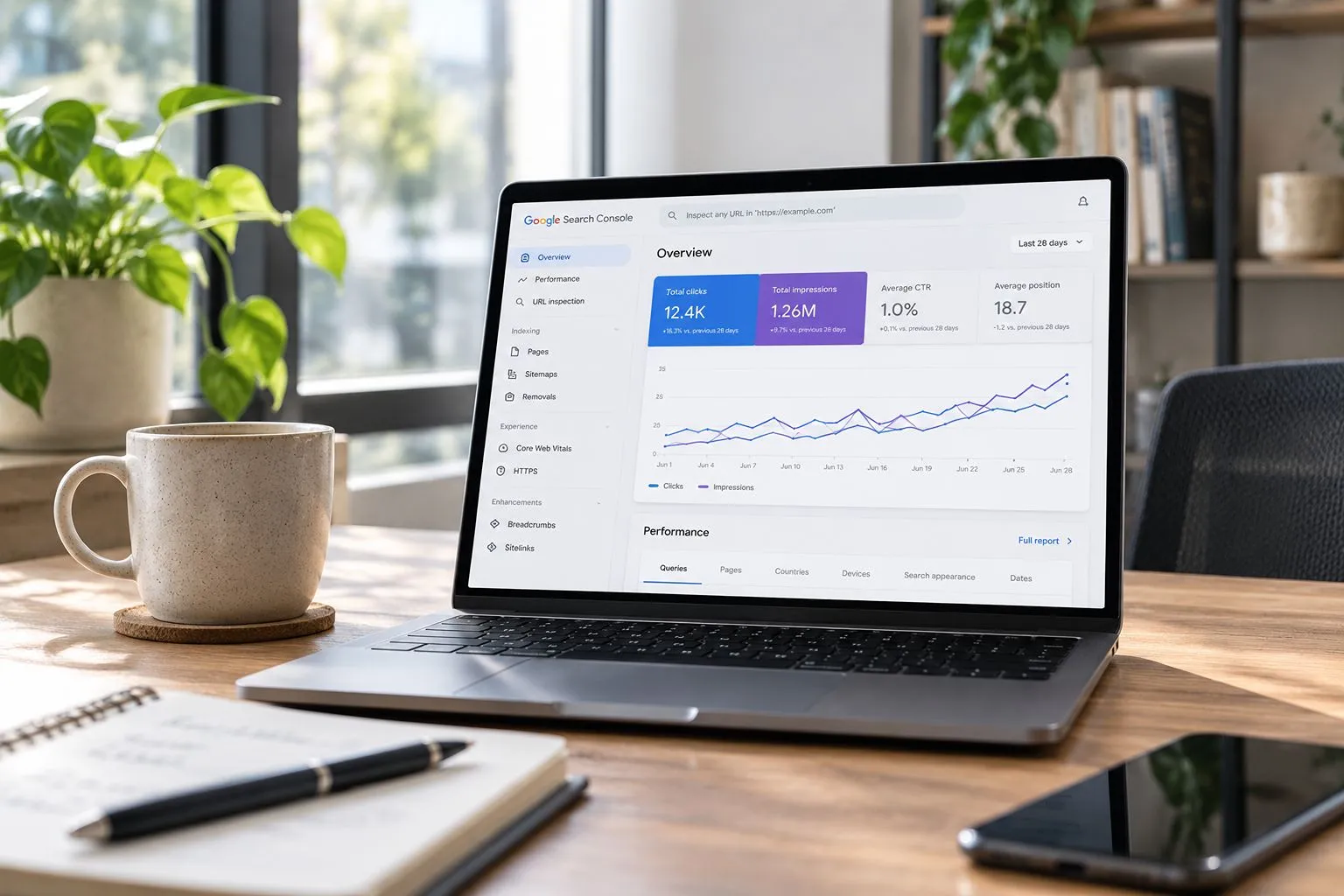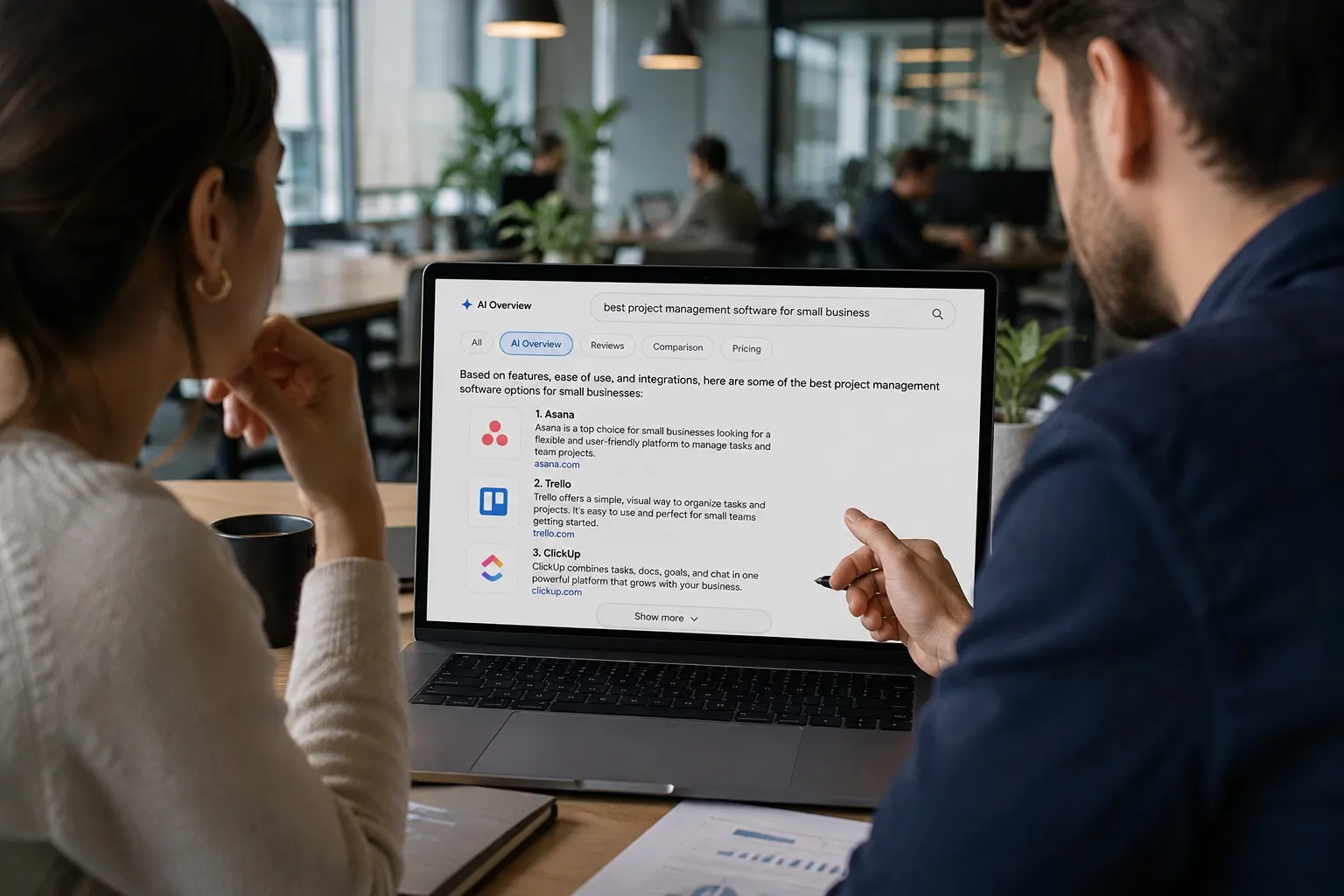
If your website isn’t appearing on Google, it may not have been crawled or indexed yet. Before any page can rank in search results, Google must discover it and add it to its search index. Many business owners think publishing a page is enough for it to appear on Google. In reality, search engines must first crawl your website, understand your content, and decide whether to index it.
Think of crawling as Google discovering your pages and indexing as adding those pages to its digital library. Only after both steps can your content become eligible to appear in search results.
In this guide, you’ll learn what crawling and indexing mean, how they work together, why they matter for SEO, and what you can do if Google isn’t finding or indexing your website.
1. What Is Crawling in SEO?
Crawling is the process search engines use to discover pages on the internet. Google’s crawler, called Googlebot, visits websites, follows links, and reads content to understand what each page is about.
In simple terms, crawling is Google’s way of exploring the web.
Every day, Googlebot visits billions of URLs looking for:
- New websites
- Newly published pages
- Updated content
- Removed pages
- Changes to existing websites
Whenever Googlebot discovers something new, it collects information about that page and decides whether it’s worth sending to the next stage of the process: indexing.
The speed at which Google crawls your pages can vary depending on several factors, such as your website’s authority, internal linking, sitemap, and how often you publish or update content. While some pages may be crawled within hours, others can take days or even weeks to be discovered.
How Does Google Discover New Pages?
Google doesn’t manually search the internet page by page. Instead, it follows connections between websites and uses several signals to discover new content.
The most common ways Google finds pages include:
- Internal links from other pages on your website
- External backlinks from other websites
- XML sitemaps submitted through Google Search Console
- Previously crawled pages that have been updated
For example, imagine you publish a new “SEO Services” page on your website.
If that page is linked from your homepage and included in your XML sitemap, Googlebot can usually discover it much faster than if it exists on its own with no links pointing to it.
This is why internal linking is one of the simplest yet most effective technical SEO practices.
What Does Googlebot Look For?
Googlebot looks for content and technical signals that help Google understand what a page is about and whether it can be accessed properly. During the crawling process, Googlebot collects information that is later used to evaluate whether a page should be indexed.
Some of the key elements Googlebot checks include:
- Page titles and headings
- Main page content
- Internal and external links
- Images and alt text
- Structured data
- Mobile usability
- Page speed and accessibility
- Technical errors, such as broken links or server issues
Googlebot doesn’t judge how well a page should rank during crawling. Instead, it gathers the information Google needs to understand the page before deciding whether to index it.
2. What Is Indexing in SEO?
Indexing is the process of storing and organizing web pages in Google’s database so they can become eligible to appear in search results. If a page isn’t indexed, it won’t appear in Google Search, regardless of how well it is optimized.
Think of Google’s index as a massive digital library. After Google crawls a page, it analyzes the content to understand what it’s about, how useful it is, and whether it should be stored in its search index. Once indexed, the page becomes eligible to appear for relevant search queries.
During the indexing process, Google evaluates several signals, including:
- Content quality and originality
- Search intent and relevance
- Internal linking
- Duplicate content
- Structured data
- Mobile usability
- Technical accessibility
These signals help Google determine whether a page provides enough value to be included in its index. If the page meets Google’s quality standards, it can appear in search results when users search for related topics.
For example, imagine you publish a new service page about Website Audit Services. Googlebot first discovers and crawls the page, then evaluates its content. If Google determines that the page is unique, accessible, and helpful, it adds it to its index. From that point on, the page can compete for rankings whenever someone searches for relevant keywords.
What Happens During Indexing?
After crawling a page, Google evaluates many different signals before deciding whether to index it.
Some of these include:
- Content quality
- Originality
- Relevance
- Duplicate content
- Internal linking
- Technical accessibility
- Metadata
- Structured data
Google also attempts to understand what the page is about.
For example, it may recognize that a page explains:
- Website audits
- SEO
- PPC advertising
- Email marketing
- Web design
This understanding helps Google decide which searches the page may be relevant for in the future.
How Does Google Decide Whether to Index a Page?
Google decides whether to index a page by evaluating its quality, originality, relevance, and technical accessibility. Not every crawled page is added to Google’s index, especially if it doesn’t provide enough value or contains technical issues.
When deciding whether to index a page, Google considers factors such as:
- Whether the content is original and helpful
- If the page satisfies a clear search intent
- Whether the page can be accessed by Googlebot
- Duplicate or near-duplicate content
- Internal linking and website structure
- noindex tags or robots.txt restrictions
- Overall page quality and user value
For example, a well-written service page with unique content and strong internal links is much more likely to be indexed than a short page with duplicate information and no clear purpose. Once a page is indexed, it becomes eligible to appear in search results, although its ranking will still depend on many other SEO factors.
3. Why Crawling and Indexing Matter for SEO
Crawling and indexing are essential because search engines can’t rank pages they haven’t discovered or stored in their index. Even the best content can’t generate organic traffic if Google can’t access it.
Many businesses spend time creating high-quality content, researching keywords, and optimizing their pages, yet still struggle to appear in search results. In many cases, the problem isn’t the content itself; it’s that Google hasn’t crawled or indexed the page properly.
Understanding how crawling and indexing work helps you identify technical issues before they affect your SEO performance. It also ensures that your content has the opportunity to compete for relevant searches and reach potential customers.
Crawling Comes Before Indexing
Google must crawl a page before it can decide whether to index it. In other words, indexing can’t happen until Google has first discovered and analyzed your content.
Many people use the terms crawling and indexing interchangeably, but they describe two different stages of the same process.
Here’s how Google’s workflow typically looks:
- Google discovers a URL.
- Googlebot crawls the page.
- Google analyzes the content and technical signals.
- Google decides whether to index the page.
- The indexed page becomes eligible to appear in search results.
It’s important to remember that not every crawled page gets indexed. Google may choose to exclude pages that are duplicated, blocked, or don’t provide enough value to users.
For example, if your website has two pages with nearly identical content, Google may crawl both but only index one of them. Similarly, a page with a noindex tag may be crawled but intentionally excluded from the search index.
Understanding this sequence helps explain why publishing a page doesn’t automatically mean it will appear on Google.
4. Crawling vs Indexing: What’s the Difference?
Crawling and indexing are closely related, but they’re not the same thing. Crawling is how Google discovers your pages, while indexing is how Google stores them so they can appear in search results.
A simple way to understand the difference is to think of Google’s workflow as a two-step process. First, Googlebot visits your website and collects information about a page. Then, Google decides whether that page is valuable enough to be added to its search index.
| Crawling | Indexing |
| Discovers web pages | Stores web pages in Google’s index |
| Performed by Googlebot | Performed by Google’s indexing systems |
| Happens first | Happens after crawling |
| Doesn’t guarantee indexing | Doesn’t guarantee rankings |
Although these processes work together, they’re independent. A page can be crawled without being indexed, and an indexed page still needs high-quality SEO to rank well.
Understanding this distinction makes it much easier to diagnose SEO issues. If your page isn’t appearing in search results, the problem could be that Google hasn’t discovered it yet or that it discovered it but chose not to index it.
5. How Google Crawls and Indexes a Website
Google follows a structured process to discover, analyze, and organize web pages before they become eligible to appear in search results. Understanding this process helps businesses see where SEO problems may happen, especially when a page is live but still not visible on Google.
While the process happens automatically, it usually follows the same general path: Google discovers a URL, crawls the page, analyzes the content, decides whether to index it, and then considers it for relevant search results.
Step 1: Google Discovers the URL
Google first needs to discover a page before it can crawl or index it. One of the easiest ways to help Google find new or updated pages is by submitting an XML sitemap through Google Search Console.
Google can discover URLs through:
- Internal links
- External backlinks
- XML sitemaps
- Previously crawled pages
An XML sitemap acts like a roadmap for your website, helping Google understand which pages exist and should be crawled. While Google can often find pages through links alone, submitting a sitemap can speed up the discovery process, especially for new websites or recently published content.
External backlinks also play an important role in helping Google discover new pages. When reputable websites link to your content, Googlebot can follow those links to find and crawl your pages more efficiently. To learn more about building high-quality backlinks, read our guide on Comprehensive Link Building Guide for Startups.
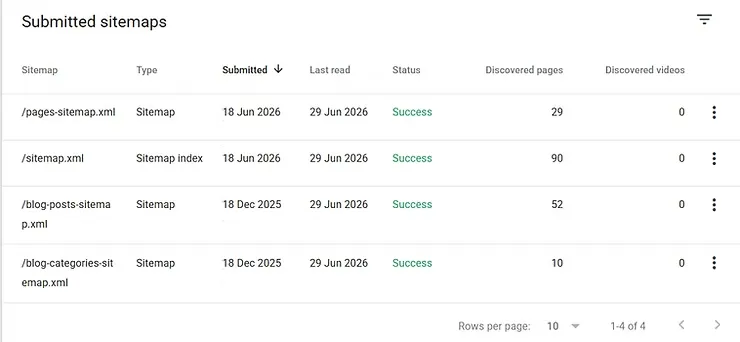
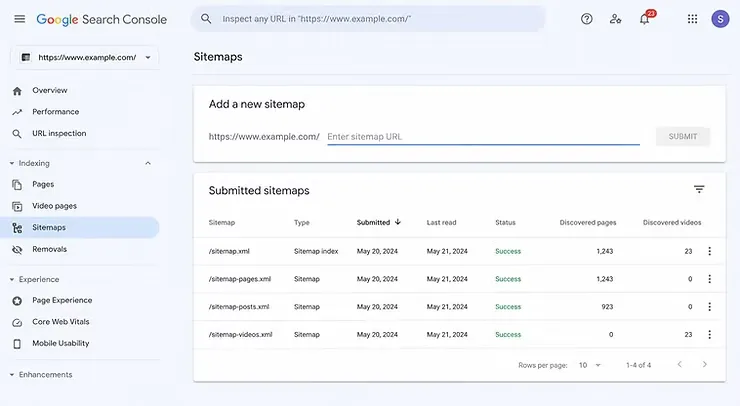
The Google Search Console Sitemaps report shows whether your XML sitemap has been successfully submitted and processed. It also displays how many pages Google has discovered through each sitemap, making it a useful starting point for monitoring your site’s discoverability.
Step 2: Googlebot Crawls the Page
Once Google discovers a URL, Googlebot visits the page to collect information. During crawling, it reads the page’s content, follows links, and checks whether the page can be accessed and processed successfully.
While crawling a page, Googlebot evaluates several elements, including:
- Page titles and headings
- Main content
- Images and alt text
- Internal and external links
- Structured data
- Mobile usability
- Technical accessibility
Google also records important crawl information, such as when the page was last visited, whether crawling was allowed, and whether it was able to fetch the page successfully. If Googlebot encounters issues, such as blocked resources, server errors, or inaccessible pages, it may not be able to crawl the page correctly, which can delay or prevent indexing.
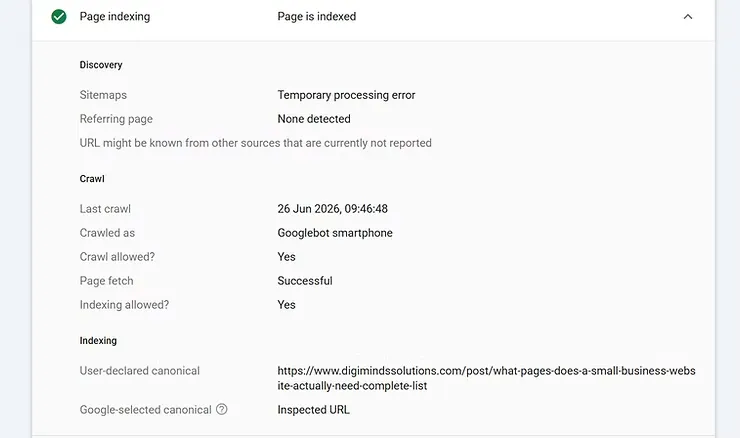
The URL Inspection report in Google Search Console provides detailed information about Google’s latest crawl. It shows when Googlebot last visited the page, whether crawling and indexing are allowed, and whether Google was able to access the page successfully.
Step 3: Google Analyzes the Content and Technical Signals
After crawling the page, Google evaluates both the content and the technical setup. This helps Google decide whether the page is useful, accessible, original, and relevant enough to be considered for indexing.
At this stage, Google may look at:
- Whether the content is unique or duplicated
- Whether the page matches a clear search intent
- Whether the page is mobile-friendly
- Whether there are canonical tags
- Whether the page has a noindex tag
- Whether the content is thin or helpful
- Whether the page is easy to understand
- Whether internal links support the page
For example, if two service pages have almost the same content with only a city name changed, Google may decide that one version is not valuable enough to index. Similarly, if a page has a noindex tag, Google may crawl it but exclude it from search results.
Step 4: Google Decides Whether to Index the Page
Indexing is not automatic. After analyzing the page, Google decides whether to add it to its index.
A page is more likely to be indexed when it is:
- Accessible to Googlebot
- Internally linked
- Unique
- Useful
- Technically clean
- Relevant to a clear topic
- Not blocked by robots.txt
- Not marked with noindex
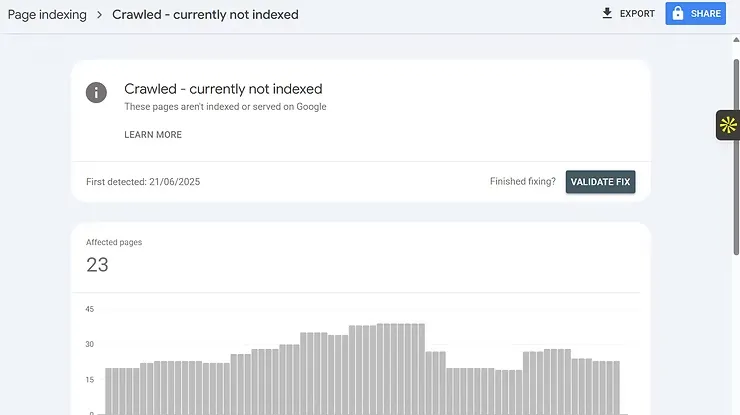
If Google believes the page does not provide enough value, is too similar to another page, or has technical issues, it may choose not to index it. This is why some pages appear in Google Search Console as Discovered – currently not indexed or Crawled – currently not indexed.
For small businesses, this often happens with thin service pages, duplicate location pages, outdated blog posts, or pages that are not linked clearly from the main website structure.
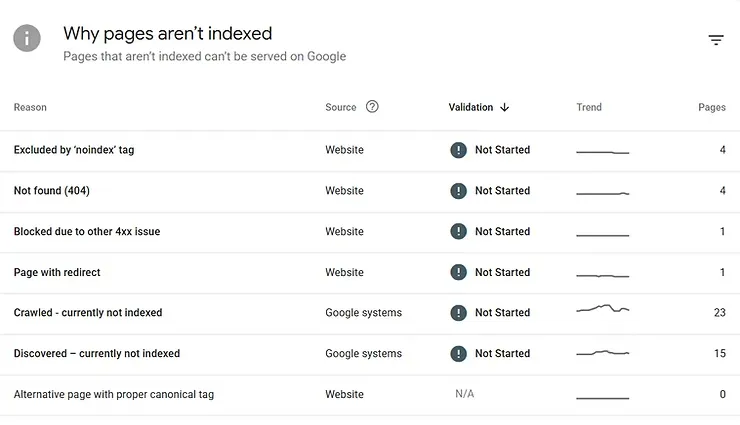
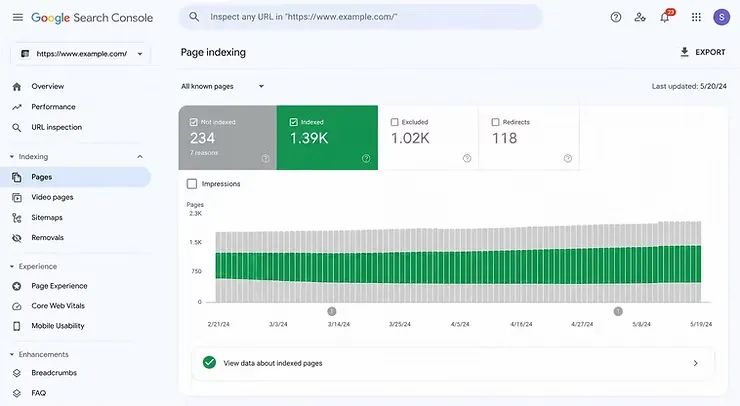
The Page Indexing report in Google Search Console explains why certain pages are excluded from Google’s index, helping website owners identify technical and content-related indexing issues.
Step 5: The Page Becomes Eligible to Rank
Once a page is indexed, it becomes eligible to appear in Google Search. However, indexing does not guarantee that the page will rank highly or receive traffic.
After indexing, Google still needs to decide:
- Which search queries is the page relevant for
- How helpful is the content compared to competitors
- How trustworthy the website appears
- Whether the page satisfies search intent
- How strong is the page from an SEO perspective
For example, a newly indexed blog post about technical SEO may be eligible to appear in search results, but it still needs strong content, good internal linking, relevant keywords, and authority to compete with established websites.
In short, indexing gives your page a chance to rank. SEO determines how strong that chance is.
6. Why Your Website May Not Be Indexed
Your website may not be indexed because Google couldn’t access the page, found technical issues, or determined that the content wasn’t valuable enough to include in its search index. Even if a page has been crawled, Google may still choose not to index it.
If your pages aren’t appearing in Google Search, the first step is identifying why they were excluded. Google Search Console’s Page Indexing report provides valuable insights into indexing issues and helps you determine what needs to be fixed.
Some of the most common reasons pages aren’t indexed include:
- The page is blocked from indexing: Google won’t index a page if it contains a noindex tag or is blocked by your website’s robots.txt file. These settings are often added intentionally during development but can sometimes remain in place after a website goes live.
- The content is thin or low quality: Google prioritizes pages that provide unique, helpful, and relevant information. Pages with very little content, duplicate information, or automatically generated text may be crawled but excluded from the index.
- The page has no internal links: Pages that aren’t linked from other areas of your website, often called orphan pages, are more difficult for Googlebot to discover. A strong internal linking strategy helps Google find and understand your most important content.
- Duplicate content exists: When multiple pages contain nearly identical content, Google may choose to index only one version. This commonly happens with location pages, product variations, or pages targeting the same keywords.
- The page was recently published: New content isn’t always indexed immediately. Depending on your website’s authority, crawl frequency, and overall health, Google may take anywhere from a few hours to several weeks to crawl and index a new page.
- Technical errors are preventing indexing: Issues such as broken redirects, server errors, incorrect canonical tags, or blocked resources can make it difficult for Google to properly process a page.
Regularly reviewing your Page Indexing report in Google Search Console can help you identify these issues early and resolve them before they affect your organic visibility.
7. How to Help Google Crawl and Index Your Website
The best way to help Google crawl and index your website is to make your content easy to discover, access, and understand. While Google handles the crawling and indexing process automatically, following SEO best practices can improve your chances of getting important pages indexed more quickly.
Here are some practical ways to help Google crawl and index your website more effectively:
- Create and Submit an XML Sitemap:
An XML sitemap acts as a roadmap for your website, helping Google discover your most important pages more efficiently.
After creating your sitemap (usually yourdomain.com/sitemap.xml), submit it through Google Search Console.
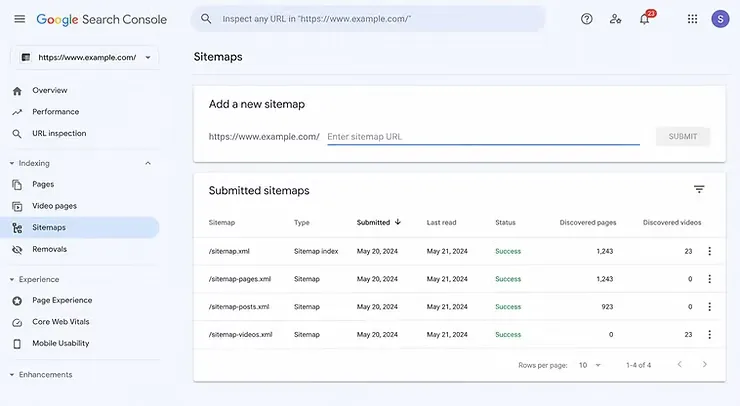
- Open Google Search Console
- Click Indexing → Sitemaps
- Enter your sitemap URL (example: sitemap.xml)
- Click Submit
- Verify that the sitemap status is Success
- Request Indexing for New Pages:
Submitting a sitemap doesn’t always mean Google will crawl a page immediately.
If you’ve published an important page or updated existing content, you can request indexing manually.
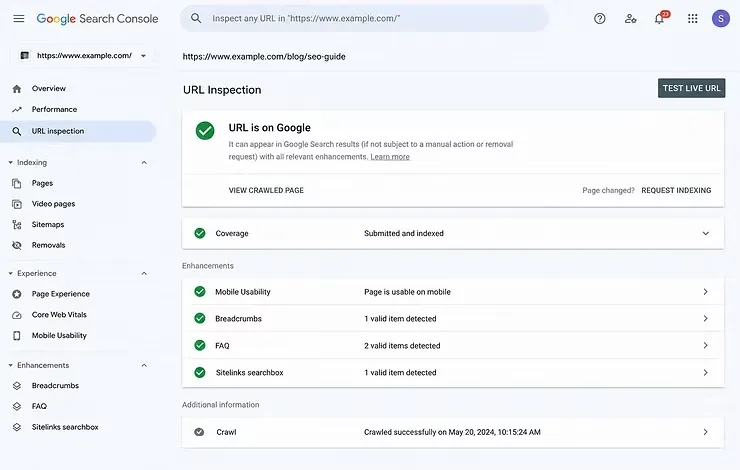
Steps:
- Paste your page URL into the URL Inspection bar.
- Wait for Google to check the page.
- Review whether the page is already indexed.
- If not, click Request Indexing.
- Google adds the page to its crawling queue.
- Build a Strong Internal Linking Structure
Internal links help Googlebot discover new pages while showing the relationship between different pieces of content.
Make sure your key pages are linked from relevant blog posts, service pages, or your main navigation.
- Publish High-Quality, Original Content
Google is more likely to index pages that provide valuable, unique information. Instead of creating multiple short pages, focus on comprehensive content that answers users’ questions and satisfies search intent.
- Monitor Google Search Console Regularly
Google Search Console helps you identify crawling and indexing issues before they impact your organic visibility. Checking your reports regularly allows you to spot problems early and ensure Google can successfully crawl and index your important pages.
Focus on these key reports:
Page Indexing Report: Review the Indexing → Pages report to see which pages are indexed and which have been excluded. If you notice important pages listed as Crawled – currently not indexed, Discovered – currently not indexed, or Excluded by “noindex” tag, investigate the cause and resolve the issue.
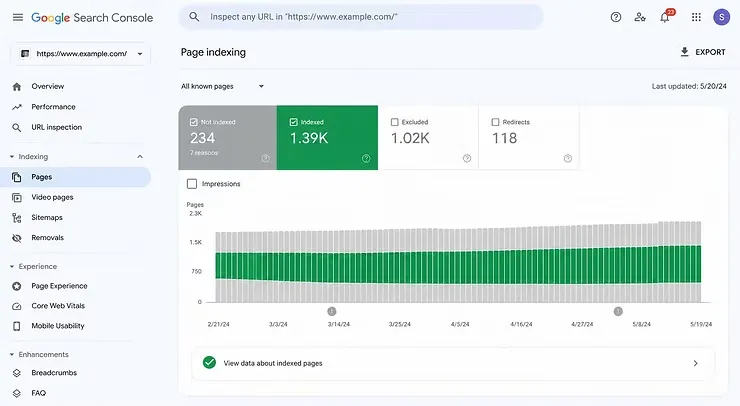
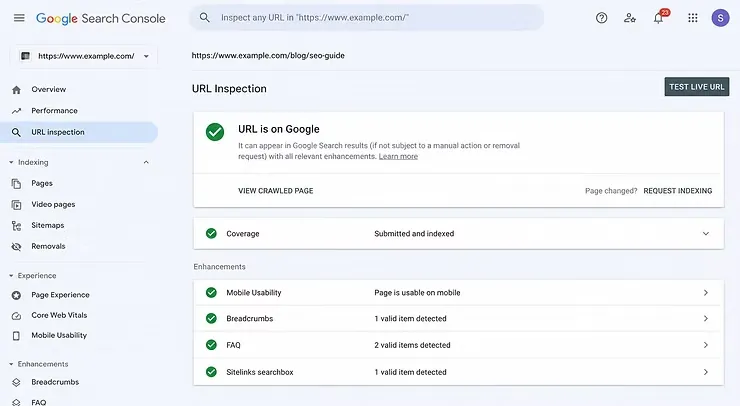
URL Inspection Tool
Use the URL Inspection tool to check the indexing status of individual pages. This report shows whether a page is indexed, when it was last crawled, and whether Google encountered any crawling issues. After making important updates, you can also request re-indexing directly from this tool.
Sitemaps Report
Visit Indexing → Sitemaps to confirm that your XML sitemap has been successfully submitted and processed. If Google reports any errors, fix them promptly so your newest pages can be discovered more efficiently.
6. Fix Technical Issues That Affect Crawlability
Technical issues can prevent Google from accessing and indexing your pages properly. Regularly reviewing your website for crawl-related errors helps ensure that your important pages remain accessible to both users and search engines.
One of the easiest ways to identify these issues is by checking the Page Indexing report in Google Search Console.
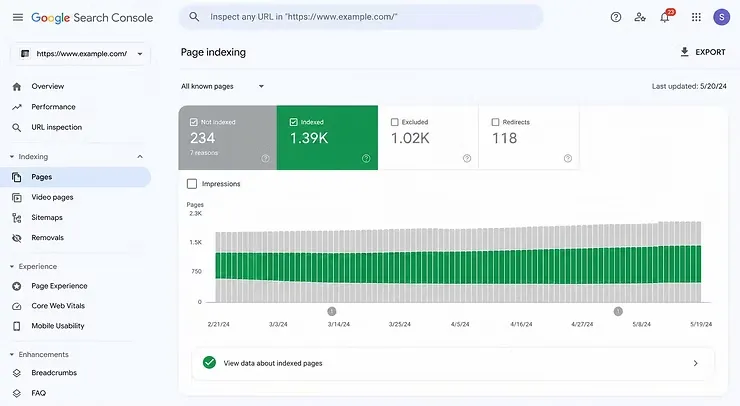
In this report, you can quickly identify issues such as:
- Not Found (404) pages
- Pages blocked by a noindex tag
- Redirect errors
- Pages blocked by robots.txt
- Pages marked as Crawled – currently not indexed
- Pages marked as Discovered – currently not indexed
Review these reports regularly and resolve any issues affecting important pages to help Google crawl and index your website more efficiently.
7. Keep your content updated
Regularly refreshing important pages signals to Google that your website is active. Updating outdated information, improving content quality, and adding new insights can encourage Googlebot to revisit your pages more frequently.
Following these best practices won’t guarantee instant indexing, but they make it much easier for Google to discover, crawl, and evaluate your content over time.
8. Common Crawling and Indexing Mistakes
Many indexing issues are caused by simple technical mistakes rather than major SEO problems. Identifying and fixing these issues can significantly improve your website’s visibility in search results.
Some of the most common crawling and indexing mistakes include:
- Blocking important pages with a noindex tag
- Forgetting to submit an XML sitemap
- Publishing duplicate or thin content
- Creating orphan pages with no internal links
- Leaving broken links and 404 errors unresolved
- Blocking Googlebot through robots.txt
- Ignoring warnings in Google Search Console
- Assuming every published page is automatically indexed
Many of these issues can be identified using a technical SEO audit and corrected before they begin affecting your organic performance.
9. Takeaways: What Businesses Should Know About Crawling and Indexing
Crawling and indexing are the foundation of every successful SEO strategy. Before a page can rank in Google Search, it must first be discovered, crawled, and added to Google’s index.
Key takeaways from this guide include:
- Crawling and indexing are two different processes.
- Google must crawl a page before it can be indexed.
- Indexed pages become eligible to appear in search results, but indexing alone doesn’t guarantee rankings.
- Strong internal linking and XML sitemaps help Google discover new content more efficiently.
- Google Search Console is one of the best tools for monitoring crawl and indexing issues.
- Regular technical SEO audits can help identify problems before they affect your website’s visibility.
By understanding how Google processes your website, you can build a stronger technical SEO foundation and improve your chances of reaching more potential customers through organic search.
10. How DigiMinds Helps Businesses Improve Technical SEO
Many businesses invest in content creation and on-page SEO but overlook the technical foundation that allows search engines to discover, crawl, and index their websites effectively. Without a technically healthy website, even the best content can struggle to achieve consistent organic visibility.
At DigiMinds Solutions, we help startups, small businesses, and growing companies strengthen their technical SEO foundation through website audits, crawlability analysis, indexing improvements, website structure optimization, and ongoing SEO support.
Our experience includes projects such as İnvitro Laboratuvarı SEO Project, where we improved the website’s technical structure and organic visibility, and YouWish SEO Project, where technical optimization supported long-term organic growth and search performance.
Whether you’re launching a new website or improving an existing one, we help ensure your website is accessible to search engines and built for sustainable SEO success.
11. FAQ
1. How do I know if Google has indexed my website?
The easiest way is to use the URL Inspection Tool in Google Search Console. You can also search site:yourdomain.com in Google to see which pages have been indexed. If a page isn’t indexed, Search Console may also provide information about why it was excluded.
2. How long does it take Google to crawl and index a new page?
It depends on your website’s authority, internal linking, and crawl frequency. Some pages are indexed within a few hours, while others may take several days or even weeks. Submitting your URL through Google Search Console can sometimes help Google discover new content faster.
3. Can a page be crawled but not indexed?
Yes. Google may crawl a page but decide not to index it if the content is low quality, duplicated, blocked by a noindex tag, or doesn’t provide enough value for users. Improving the page and strengthening its internal links may increase its chances of being indexed.
4. Why does Google Search Console show “Crawled – Currently Not Indexed”?
This status means Google successfully visited your page but decided not to add it to its search index. Improving the page’s content quality, originality, and internal linking may increase its chances of being indexed.
5. Does submitting an XML sitemap guarantee indexing?
No. An XML sitemap helps Google discover your pages more efficiently, but Google still decides whether a page should be indexed based on its quality, relevance, and technical accessibility. Keeping your sitemap up to date and following SEO best practices can improve your chances of getting important pages indexed over time.
6. Can technical SEO issues prevent my website from appearing on Google?
Yes. Issues such as broken links, blocked pages, incorrect noindex tags, server errors, or poor internal linking can prevent Google from crawling or indexing important pages. Regularly monitoring Google Search Console and performing technical SEO audits can help identify and fix these issues before they affect your search visibility.
7. Should I request indexing for every new page?
Not necessarily. Google can usually discover new pages through internal links and your XML sitemap. However, requesting indexing in Google Search Console can be helpful for important pages or newly published content that you want Google to discover sooner.
8. What’s the difference between crawling, indexing, and ranking?
Crawling is how Google discovers your pages, indexing is how it stores them in its search database, and ranking is how it decides where those pages appear in search results. A page must first be crawled and indexed before it can compete for rankings.
9. How often should I check Google Search Console?
It’s a good practice to review Google Search Console at least once a month or whenever you publish significant website updates. Regular monitoring helps you identify crawling and indexing issues before they impact your SEO performance.
12. Contact & Support
A technically sound website is essential for long-term SEO success. If search engines can’t properly discover, crawl, or index your pages, your content won’t have the opportunity to appear in search results or reach potential customers.
At DigiMinds Solutions, we help startups and growing businesses build strong technical SEO foundations that improve website visibility, crawlability, and indexing. Our approach includes technical SEO audits, website structure optimization, Google Search Console monitoring, and strategies that support sustainable organic growth.
Whether you’re experiencing indexing issues, planning a new website, or looking to improve your existing SEO performance, our team can help identify technical barriers and create a stronger foundation for long-term search visibility.
Contact us at +90 507 830 2127 or info@digimindssolutions.com.
References:
- Google: https://developers.google.com/search/docs/fundamentals/how-search-works#crawling
- Cloudflare: https://www.cloudflare.com/learning/bots/what-is-a-web-crawler/
- Semrush: https://www.semrush.com/blog/website-crawler/
- Wix: https://www.wix.com/blog/what-is-web-indexing
- Wikipedia: https://en.wikipedia.org/wiki/Web_indexing